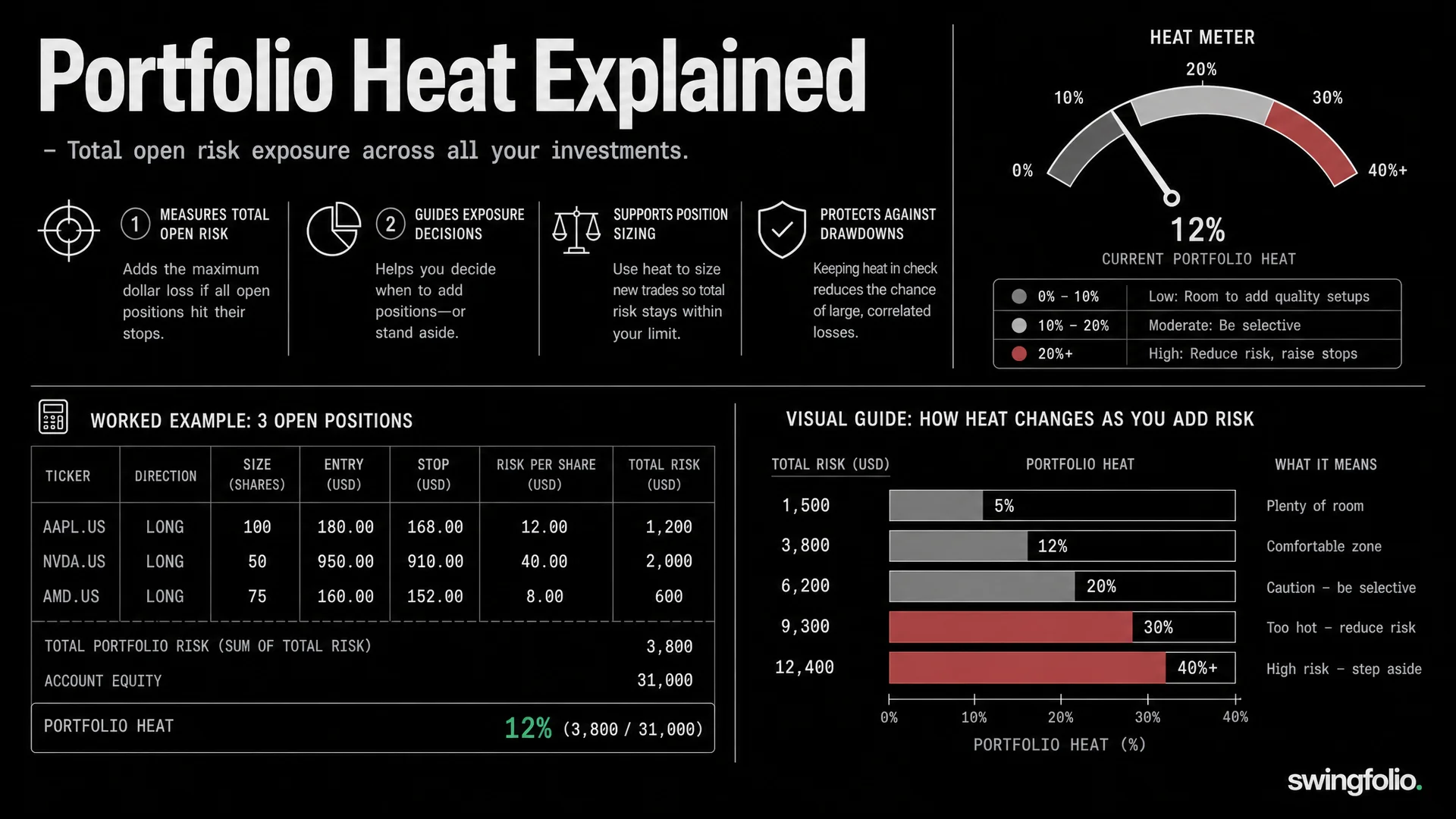
Portfolio heat is the share of your account that you could lose if every open position reached its current stop. Check it before adding a trade, because a sensible position can still push the whole account beyond the risk you planned.
This guide shows the calculation, a daily workflow and a worked capacity example. There is no universal safe heat percentage. Your limit has to reflect your strategy, drawdown tolerance and how often your positions move together.
What portfolio heat measures
For each open trade, calculate the money at risk from the current stop:
Long planned stop risk = max(entry price - stop price, 0) x units
Short planned stop risk = max(stop price - entry price, 0) x units
Then add the position risks and divide by account equity:
Portfolio heat = total open risk / account equity x 100
Suppose a $50,000 account holds three long positions:
| Position | Entry | Stop | Units | Dollar risk | Account heat |
|---|---|---|---|---|---|
| Fictional ALP.AU | $25.00 | $23.50 | 200 | $300 | 0.60% |
| Fictional BRV.AU | $48.00 | $44.00 | 100 | $400 | 0.80% |
| Fictional CED.AU | $32.00 | $30.00 | 150 | $300 | 0.60% |
Total open risk is $1,000, so portfolio heat is 2.0%.
Heat is planned stop risk, not a promise about the maximum loss. A gap through a stop, slippage or an order that does not fill can produce a larger loss. Open profit and loss does not replace this calculation. A profitable trade still carries planned loss risk while a long stop is below entry or a short stop is above entry.
Why individual position risk is not enough
Sizing every trade at 1% does not mean the account carries only 1% risk. Five open trades at 1% each create 5% heat before you consider correlation.
Correlation matters because several positions can respond to the same event. Four miners may look like four trades, but a commodity selloff can move all four together. Heat gives the arithmetic total. A concentration check tells you whether that total understates the chance of several stops being hit at once.
Do not solve this by pretending correlated positions have an exact extra heat value. Instead, record sector, market and catalyst exposure beside the total. You can then reduce a new position, choose a less correlated setup or leave capacity unused.
A daily portfolio heat workflow
Use the same steps after each close and again before placing a new order.
- Update account equity. Use the same account value definition each day.
- Review every open position and its active stop. Remove closed units after partial exits.
- Recalculate dollar risk from the current stop and remaining units.
- Add the dollar risks, then divide by account equity.
- Group positions by sector, market theme and shared catalyst.
- Compare current heat with the limit in your written plan.
- Calculate projected heat for any proposed trade before placing it.
Moving a stop can change heat. Floor entry-based planned stop risk at zero when a long stop moves above entry or a short stop moves below entry. Do not use the locked-in gain to offset risk in another position. Track giveback from the current price and gap risk separately.
Worked capacity check before a new trade
Continue with the $50,000 account at 2.0% heat. Assume the trader's tested plan caps normal portfolio heat at 6%. That leaves $2,000 of planned capacity:
Remaining capacity = ($50,000 x 6%) - $1,000 = $2,000
A new fictional DOR.AU setup has an entry at $20.00 and a stop at $18.00. At 400 units, its risk is $800:
New trade risk = ($20.00 - $18.00) x 400 = $800
Projected total risk becomes $1,800 and projected heat becomes 3.6%. It fits the trader's 6% plan.
Now assume DOR.AU is exposed to the same commodity as ALP.AU and CED.AU. The arithmetic still says 3.6%, but the concentration has increased. The trader might take 200 units, wait for another position to close or pass on the trade. Heat answers how much planned stop risk exists. It does not decide whether the cluster is sensible.
To calculate the unit count before this check, use the free position size calculator and the full position sizing guide. The calculator sizes one trade. Portfolio heat shows how that trade affects everything already open.
How to choose a heat limit
Avoid copying a fixed percentage from another trader. A useful limit comes from your own records:
- Review losing streaks and the largest number of stops hit in the same period.
- Separate normal market conditions from stressed periods.
- Check whether sector clusters produced larger losses than the raw heat suggested.
- Choose a maximum drawdown you can follow without abandoning the plan.
- Reduce risk when the evidence for your strategy or execution is thin.
A trader with fewer, independent positions may use a different limit from one holding several stocks driven by the same index or commodity. Treat the limit as a planning boundary, then review it against actual results over a meaningful sample.
Track heat without rebuilding a spreadsheet
Swingfolio's portfolio heat tracker brings open-position risk into the same view as your trades. The wider risk management workflow connects that check with position sizing and drawdown control. Together they make the pre-trade question easier to answer: how much planned risk is open now, and how much would the next position add?
Record stops and partial exits accurately. Any heat calculation is only as useful as those inputs. Use the journal to compare planned risk with the loss you realised, especially after gaps or slippage.
Before your next order, calculate the position, add it to current heat and review concentration. If it does not fit your written limit, reduce the units or wait.
Start the 30-day trial to track stops, partial exits and total open risk in Swingfolio.