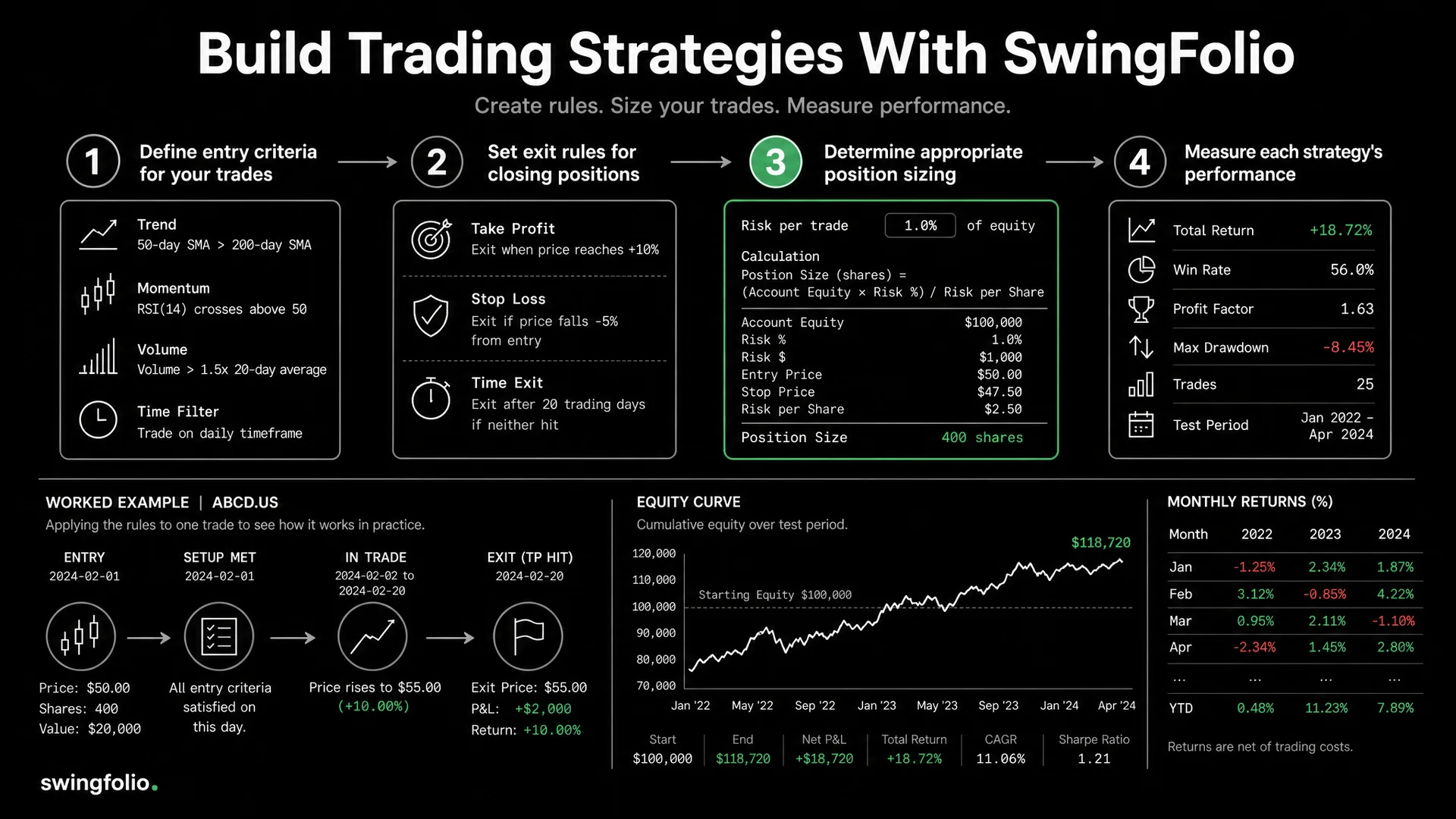
Swingfolio's strategy builder turns a trading idea into rules you can read before entry and review after exit. You can start from a template or create a strategy, add structured or custom rules, set risk defaults and link trades to the saved strategy.
The builder does not place orders or prove that a strategy has an edge. Its job is to make the plan specific enough to follow and measure.
Before you open the builder
Write the strategy in one sentence:
Buy a breakout from a 20-day high when volume confirms the move, then exit at the initial stop, at 2R, or when the setup fails.
That sentence identifies the setup, confirmation and exit logic. If you cannot explain the idea plainly, adding more indicators will not make it clearer.
Decide these points before building:
- market and timeframe;
- long, short or both;
- conditions that must be true before entry;
- conditions that invalidate the trade;
- initial stop and profit objective;
- maximum position allocation and holding period.
Step 1: Create a strategy or choose a template
Open Strategies in the Swingfolio dashboard. Select New Strategy to build from a blank form, or open the strategy template library and choose a starting point.
Templates prefill rules and risk settings. Review every field before saving because a template cannot know your market, timeframe or risk limit. You can also use the AI strategy generator on a new blank strategy to turn a written description into proposed rules. Treat its output as a draft that needs the same review.
Give the strategy a name that will still make sense in a trade list. 20-Day High Breakout, Daily tells you more than Breakout 1. Add a short description of the thesis and choose a colour for visual identification.
Step 2: Build entry rules you can answer yes or no
Open the Entry Rules tab. For structured rules, choose an indicator, a condition and a value or comparison indicator. The builder includes indicators such as SMA, EMA, RSI, MACD, Stochastic, ADX, Bollinger Bands, ATR, VWAP and volume. Use Custom for a condition that the menu does not express well.
Good rules make the decision observable. Compare:
- Vague: "Strong breakout with good volume."
- Reviewable: "Closing price is above the 20-day high" and "Volume is above 150% of the 20-day average."
A rule can still require judgment. A custom rule such as "No earnings announcement in the next five sessions" is useful if you check and record it consistently.
Avoid adding several versions of the same signal merely to make the strategy sound rigorous. Two clear conditions beat six overlapping momentum indicators when both produce the same decision.
Step 3: Define exits before the entry
Open the Exit Rules tab and write the conditions that end the trade. Include the ways a winning trade and a losing trade can close.
For the breakout example:
- Exit if price reaches the initial stop.
- Take the planned profit at 2R, or manage the exit under a separately stated trailing rule.
- Exit if price closes back below the breakout level within two sessions.
- Review the position when the maximum holding period expires.
Do not mix several incompatible exits without saying which one takes priority. If a trailing exit replaces a fixed target after price reaches +1R, write that sequence into the custom rule.
Step 4: Add risk settings
The Risk Management section accepts four optional defaults:
- Stop Loss % for the planned percentage distance from entry;
- Target R-Multiple for the reward objective relative to initial risk;
- Position Size % for the portfolio allocation;
- Max Holding Days for a time-based review point.
These fields describe the plan. They do not monitor the market or close a broker position.
Separate position allocation from account risk. A 10% allocation with a 5% stop risks about 0.5% of account equity. This estimate excludes fees and slippage:
10% x 5% = 0.5%
If a fictional $50,000 account allocates $5,000 to XYZ.ASX at $10, it buys 500 shares. A stop at $9.50 puts $0.50 per share at risk, or $250. A 2R target is $11, where potential price profit is $1 per share.
Check the numbers with the risk-reward calculator guide before saving a default that you will reuse.
Completed breakout example
Here is one full strategy to adapt rather than copy blindly.
Strategy details
- Name: 20-Day High Breakout, Daily
- Market: Liquid ASX shares
- Thesis: Enter an established upward move when price closes at a fresh short-term high with stronger volume.
Entry rules
- Closing price is above the 20-day high.
- Volume is above 150% of the 20-day average.
- Custom: the closing price is above the 50-day SMA.
- Custom: no scheduled earnings announcement in the next five sessions.
Exit rules
- Initial stop is 5% below entry.
- Target is 2R.
- Custom: exit after a close below the breakout level during the first two sessions.
- Review after 15 holding days.
Risk settings
- Stop Loss: 5%
- Target R-Multiple: 2
- Position Size: 10%
- Max Holding Days: 15
The example defines the decision, but it does not claim that these parameters suit every ASX share. Gaps can create a loss larger than planned, and a fixed percentage stop ignores differences in volatility. Paper trade the rules and adjust from evidence.
Step 5: Save and link trades to the strategy
Save the strategy after every rule is complete. Active strategies appear in trade entry forms. Select the strategy when recording a trade so its completed result contributes to that strategy's sample.
Assign the strategy you intended to trade at entry, then record which rules you broke. Those deviations belong in the strategy sample because excluding them would inflate adherence and hide execution problems. Use another strategy or leave the trade unassigned only when the evidence shows that you had no intention to trade this setup.
Broker CSV imports are available during an active trial and remain in a review step before Save. During review, add the strategy only when the source trade and your notes support the choice. CSV import does not recreate the plan that existed before entry.
Step 6: Review rules and results together
The Strategies page can sort saved strategies by total P&L, win rate, trade count or name. Open a strategy to see its rules and the linked record. Swingfolio's strategy views include measures such as win rate, trade count, total P&L and average R, plus an R-multiple distribution and rule-adherence review when the necessary trade data exists.
Use the review in this order:
- Check sample size. Three wins do not establish an edge.
- Inspect the trades. An average can hide one outlier or missing risk data.
- Compare planned and actual risk. Losses beyond -1R need an explanation.
- Review rule adherence. Separate valid strategy losses from trades that broke the setup.
- Change one thing at a time. A new entry filter plus a new stop and target creates a different strategy and hides which change mattered.
The trading journal template provides a practical structure for the notes behind those numbers.
Modify, pause or retire?
Keep a strategy unchanged long enough to collect a meaningful sample for its frequency. Then decide:
- Modify when repeated trade review identifies one specific weakness and you can state the proposed fix.
- Pause when current market conditions do not fit the setup or data quality is poor.
- Set inactive when you no longer want the strategy offered in trade entry forms but want to retain its record.
Avoid deleting history to make the active list look cleaner. An inactive strategy preserves the evidence behind why you stopped using it.
Strategy builder checklist
- Name includes setup and timeframe
- Entry rules produce clear yes or no decisions
- Exit priority is stated
- Stop, target, allocation and holding period agree
- Position allocation has been converted into account risk
- Template or AI suggestions have been reviewed
- Trades are assigned to the strategy intended at entry, including rule-breaking executions
- Changes are dated and limited to one testable idea
Frequently asked questions
Do strategy rules place trades automatically?
No. Swingfolio records and reviews the plan. It does not execute orders or automatically close a broker position.
Must every rule use a technical indicator?
No. Use custom rules for earnings dates, market regime, liquidity or other conditions that need words rather than an indicator menu.
Should I edit a strategy after every losing trade?
No. First check whether the trade followed the rules and whether the loss fits the strategy's expected variation. Frequent edits turn one strategy into a series of tiny, incomparable samples.
Build one strategy you can review honestly
Start with one setup, complete the entry and exit rules, and paper trade it before adding more conditions. Start the 30-day trial, open Strategies and build a plan whose results you will be able to explain trade by trade.