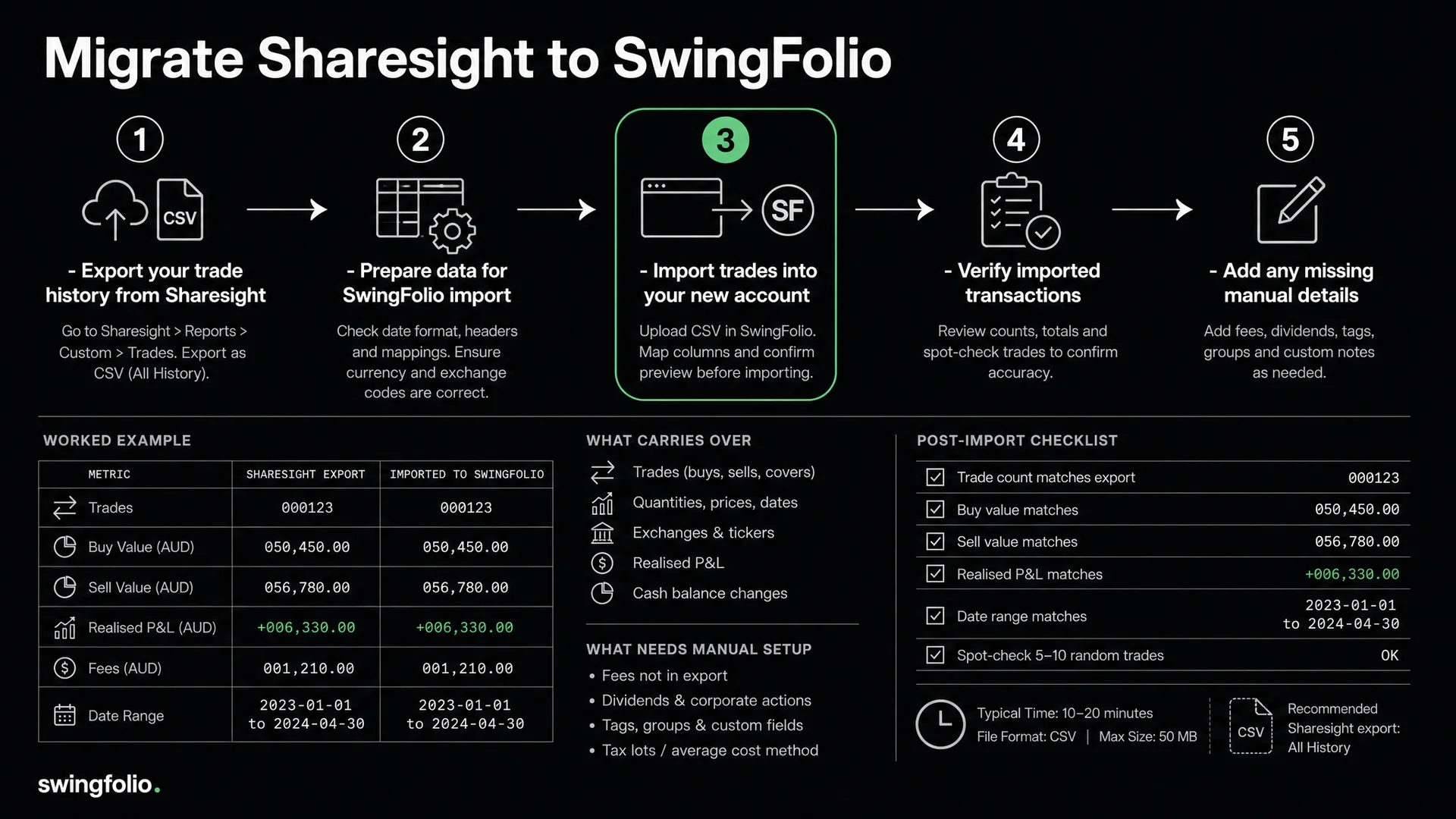
Moving from Sharesight to Swingfolio is a data-reconciliation job, not a one-click account transfer. Start with a Sharesight export, keep the original file untouched, import a small test into Swingfolio and review every proposed trade before Save.
That review matters because the two products organise information for different jobs. Sharesight has mature portfolio, income and tax reports. Swingfolio focuses on trade plans, strategy assignment and decision review. A trade export can carry transaction facts, but it cannot recreate notes or risk plans that were never recorded.
Decide whether you are moving or running both
Start with the eight trading metrics to review alongside Sharesight's reports. Use that comparison to decide which questions your current reports answer and which need a separate trading journal.
Write down what must work before changing subscriptions or closing an account. Your list may include:
- correct open quantities and average entry costs;
- completed buy and sell history with fees;
- foreign-currency trades and their conversion basis;
- dividends, franking credits and corporate actions;
- tax records and the parcel choices behind prior reports;
- strategy, stop, target and journal notes for active trades.
If you use Sharesight for passive holdings, income and year-end reports, you may keep it for those jobs while reviewing active trades in Swingfolio. There is no prize for forcing one product to replace every workflow.
Step 1: Export the Sharesight source records
Sharesight's current help instructions place the All Trades Report under Tax. Set the date range to Since Inception, run the report and export it to a spreadsheet. Sharesight documents spreadsheet, PDF and Google Drive export options; choose the spreadsheet because you need structured rows.
Also export or save the reports you use to reconcile the portfolio. The trade file alone may not contain every relevant record:
- All Trades Report for buys, sells and adjustments.
- Current holdings or Performance Report for quantities and values at a chosen date.
- Taxable Income or dividend records if income history matters.
- CGT reports and supporting records for completed tax years.
- Notes about manually confirmed dividends, corporate actions or custom investments.
Sharesight warns that recreating a portfolio from its All Trades export does not carry adjusted and confirmed dividends or corporate actions. Treat that as a useful boundary for any migration: keep those records separate and reconcile them rather than assuming a trade file contains them.
Store an untouched copy of every export. Work on a duplicate if you need to change headings or remove rows.
Step 2: Inspect the file before importing
Open the spreadsheet and identify what each row represents. Check these columns where present:
- trade date and buy or sell side;
- ticker and exchange;
- quantity and execution price;
- brokerage or other fees;
- transaction currency and exchange-rate information;
- adjustments, opening balances and zero-price rows.
Do not convert an adjustment into a normal trade to make the importer accept it. A split, consolidation or return of capital can change quantity or cost base without representing a market buy or sell.
Use the exchange as part of the instrument identity. BHP.ASX and BHP.LSE should not collapse into one symbol. If the export uses a market name rather than the suffix Swingfolio expects, correct the mapping during review.
Build a small test file first
Copy 10 to 20 representative rows into a test file. Include:
- one simple completed trade;
- one position with several buys or partial sells;
- one open holding;
- one foreign-currency trade;
- one row with fees;
- one unusual row you expect to handle manually.
This small test reveals mapping and date problems before they affect years of history.
Step 3: Import into Swingfolio and review before Save
Broker CSV import is available during an active Swingfolio trial. Open the import workflow, upload the test CSV and let the mapper identify the columns. Confirm date, symbol, exchange, side, quantity, price, fees and currency against the source file.
The import produces proposed records for review. Inspect them before selecting Save. Swingfolio does not execute trades and the CSV workflow does not create an automatic ongoing Sharesight sync.
Check three rows line by line:
- A basic completed trade should have the same dates, quantities, prices and fees.
- A partial exit should retain the remaining open quantity.
- A foreign trade should keep its transaction currency and the expected displayed value.
If a required column is absent or ambiguous, stop and correct the test file or mapping. Do not infer old stops, strategies or currencies merely to fill a field.
Step 4: Reconcile holdings before importing the rest
After saving the test, compare the result with the same Sharesight records. Then import the full file in manageable groups and repeat the checks.
Holdings and trade history
For each ticker, reconcile:
Opening quantity + buys - sells + valid quantity adjustments = closing quantity
Compare open quantity first. Then spot-check complete trade chains with multiple entries or exits. A matching total row count is useful, but it does not prove that rows were matched into positions correctly.
Fees and realised results
Pick several closed trades and rebuild the cash result from executions and fees. Include at least one partial exit. Differences can come from fee placement, parcel matching, rounding or currency conversion, so record the cause rather than accepting a vague near-match.
Foreign currency
Compare source-currency cash flows and the AUD result separately. A transaction exchange rate, a current quote conversion and a tax exchange rate can answer different questions. Preserve the original source records when those bases differ.
Income and corporate actions
Do not use matching trade quantities as proof that dividend, franking or corporate-action history moved across. Reconcile cash dividends, reinvested amounts, splits and consolidations separately. Keep Sharesight exports and issuer or broker statements where Swingfolio does not represent the same event.
Step 5: Add trading context only when evidence exists
An All Trades export can provide transactions. It does not provide the plan that existed before each trade unless you recorded that elsewhere.
Create strategies in Swingfolio, then assign imported trades where your notes support the classification. Add an initial stop or target only from a dated plan, chart note or broker record. Reconstructing a perfect plan from the outcome creates false R-multiple data.
For older history without reliable notes, keep the P&L record and leave the missing decision fields blank. Start complete strategy and risk records from today. The guide to starting a trading journal explains the minimum useful fields.
Migration reconciliation checklist
- Untouched source exports stored safely
- Test file reviewed before the full import
- Proposed rows checked before Save
- Tickers paired with the correct exchanges
- Open quantities match at the same date and time
- Partial entries and exits checked as complete chains
- Fees reconciled for a sample period
- Foreign-currency basis documented
- Dividends and franking checked separately
- Corporate actions identified rather than forced into trades
- CGT reports and tax source records retained
- Strategies, stops and notes added only from evidence
- Full export kept even if an account is later closed
When is the migration complete?
Call it complete when the records needed for your chosen workflow reconcile, not when the importer reaches its final screen. Keep both systems available through at least one review cycle if closing Sharesight would remove easy access to reports you still need.
Do not assume two products will produce identical tax figures. Parcel selection, adjustments, currency conversion and missing events can change a result. Swingfolio can organise trade data for review, but it does not certify a tax return. Preserve contract notes and ask a registered tax agent about material differences.
Frequently asked questions
Can I transfer everything with one Sharesight file?
No single trade file should be treated as a complete archive. Sharesight's own help material notes limits around dividends and corporate actions when an All Trades export is used to recreate a portfolio. Export supporting reports for the records you rely on.
Can I import several Sharesight portfolios?
Export and test each portfolio separately, then import it into the intended Swingfolio portfolio. Separate files make reconciliation and error correction easier.
Should I invent stops for historical trades?
No. Use dated evidence. Without it, historical P&L can still be useful, but the R-multiple should remain unavailable.
Does the migration create an automatic Sharesight connection?
No. This workflow uses a file export and a reviewed CSV import. It does not create ongoing automatic sync or trade execution.
Move one verified sample first
Export your source records, test a representative sample and reconcile it before expanding the import. Start the 30-day trial when you are ready to review proposed CSV records before Save and build the strategy context that a transaction export cannot contain.
Sharesight is a registered trademark of Sharesight Limited. Export references are based on Sharesight's public help material reviewed in September 2026.